How to run ERGO-ii anlaysis in the computational infrastructure of INAB
Prerequisites
Install R
Follow instructions here: The Comprehensive R Archive Network. If you cannot download R on your local machine please contact inab-support@certh.gr.
Install RStudio
Follow instructions here: RStudio Desktop - Posit (2: Install RStudio). If you cannot download R on your local machine please contact inab-support@certh.gr.
Organize your data with the following structure
Your data should be organized with the following format:
my_data/
├─ Group1/
│  ├─ Clonotypes/
│  │  ├─ Clonotypes_sample1.txt
│  │  ├─ Clonotypes_sample2.txt
│  │  ├─ ...
│  ├─ peptides.xlsx
├─ Group2/
│  ├─ Clonotypes/
│  │  ├─ ...
│  ├─ peptides.xlsx
├─ .../
│  ├─ .../
│  ├─ ...
Peptides file
The peptides file is a 3 – column table containing the following information:
| HLA allele | Peptide | Sample |
|---|---|---|
| HLA-A*02:02 | AMAIAVPANV | Sample1 |
| HLA-A*02:02 | MAIAVPANV | Sample1 |
| HLA-A*03:01 | AIAVPANVY | Sample2 |
| HLA-C*07:01 | QSYSPPFSF | Sample3 |
Creating ERGO-II input files
1. Open RStudio
2. Set up your working directory
Find the folder where your data are located and choose “Set as Working Directory”
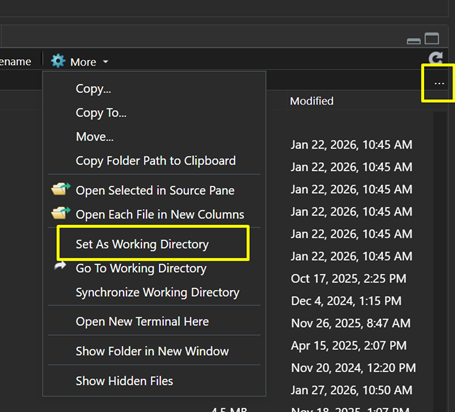
3. Download the necessary R scripts
Find them here: ERGO-helpers/R at main · BiodataAnalysisGroup/ERGO-helpers and place them into your working directory.
4. Open the 01.build_ergo_inputs.R
Update it with the right path of the data to run first (lines 14 + 15, remove the others if necessary).
5. Provide an output folder name of preference (line 17)
6. Run the script
7. When complete a folder will be created with the following structure:
my_output_folder/
├─ ergo-ii-input_sample1.csv
├─ ergo-ii-input_sample2.csv
├─ ...
Steps to run ERGO:
1. Log in to the appropriate server:
o 160.40.71.4
2. Move to the your working directory:
cd /work/folder_of_each_user3. Create a new analysis directory:
mkdir ergo-ii_2026-01-074. Move to the your new analysis directory:
cd /work/ergo-ii_2026-01-075. Download script to your analysis directory
git clone https://github.com/BiodataAnalysisGroup/ERGO-helpers.git6. Move to the your new analysis directory:
cd ERGO-helpers/ERGO-II7. Create a folder named data and upload your data there:
mkdir data8. Create a sample list:
ls -la data/ | awk '{print $9}' | awk -F "_" '{print $2}' | awk -F "." '{print $1}' | sort | uniq > SampleList9. Remove samples that should not be analyzed:
nano SampleListIn order to edit the SampleList use the following:
o Delete button: Removes one letter
o Ctrl + k: Removes a whole row
o Ctrl + o and Enter: Saves the modified SampleList
o Ctrl + x: Exits and returns to the terminal
10. Run the analysis
You have to update with the right path
bash runERGO-II.sh > run.shnohup bash run.sh &